8.11 Hugging Face Transformers API: From Structure to Calls
Author
jshn9515
Published
2026-05-09
Modified
2026-05-09
In the previous sections, we have conceptually covered the main structures of Transformer:
Token embedding and positional encoding;
Self-attention and multi-head attention;
Encoder, decoder, and encoder-decoder;
Masked self-attention and cross-attention;
Teacher forcing, autoregressive generation, and KV cache;
Three different Transformer architectures.
In this section, we connect these structures to real code interfaces.
In practice, we usually do not implement a complete Transformer from scratch. Instead, we use libraries such as Hugging Face Transformers to load pretrained models. It wraps tokenizer loading, model structure, weight loading, forward outputs, text generation, and other workflows for us. But if we only stay at the level of copying code until it runs, it is easy to miss which structure each API corresponds to.
So the focus of this section is not to list every parameter in Hugging Face Transformers, but to build a mapping:
Which Hugging Face Transformers APIs correspond to the Transformer structures we discussed earlier?
Note
This section mainly introduces commonly used Hugging Face Transformers interfaces and how they correspond to Transformer structures. Because the Transformers library is still actively updated, some API behaviors or parameters may change with new versions. If the code you run does not exactly match this text, prefer the latest official documentation.
This section does not require you to already know every specific model. You can first treat it as a model quick-reference sheet: when you see APIs such as AutoModel, AutoModelForCausalLM, or AutoModelForSeq2SeqLM, you should be able to roughly tell whether they correspond to an encoder-only, decoder-only, or encoder-decoder structure. Details of specific models will be introduced in later chapters.
from pprint import pprintimport IPython.display as ipyimport torchimport torch.nn as nnimport transformersfrom torch import Tensorprint('PyTorch version:', torch.__version__)print('Transformers version:', transformers.__version__)
When using Hugging Face Transformers, the most common workflow is:
from transformers import AutoTokenizer, AutoModelmodel_id ='google-bert/bert-base-uncased'tokenizer = AutoTokenizer.from_pretrained(model_id)model = AutoModel.from_pretrained(model_id)ipy.clear_output()
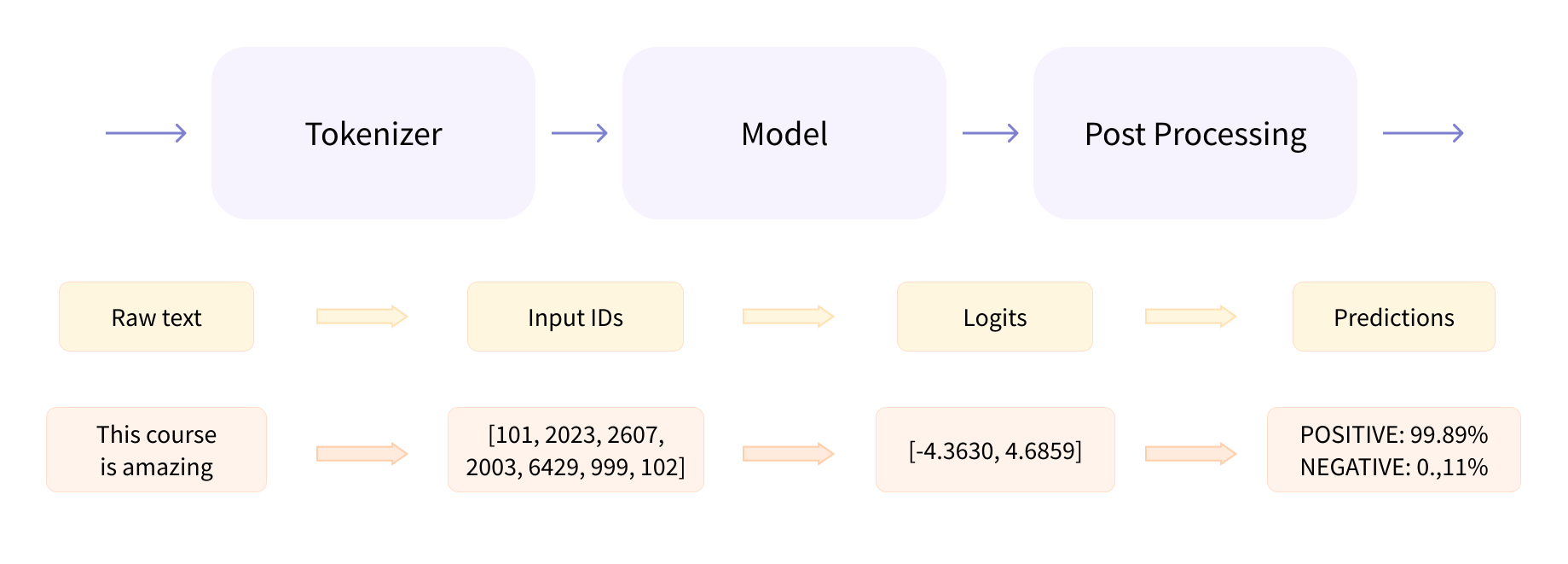
There are two core objects here: tokenizer and model. The tokenizer turns text into numeric sequences that the model can process; the model sends those numeric sequences through the Transformer and returns output representations or predictions.
The overall workflow can be written as:
Figure 8.11.1: Basic Hugging Face Transformers call flow
Here, **inputs expands the dictionary returned by the tokenizer into the arguments required by the model’s forward pass. Common fields include input_ids and attention_mask; some models also return token_type_ids and position_ids. Different model structures need slightly different inputs, but AutoTokenizer usually returns the appropriate fields automatically based on the model.
outputs is also a structured object containing the results of the forward pass. Common fields include last_hidden_state, logits, pooler_output, attentions, past_key_values, and so on. But these fields do not always appear; the exact fields depend on the model type, task head, and arguments you set when calling the model.
8.11.1.1 AutoTokenizer: From Text to Token IDs
A Transformer cannot directly process strings. It needs token IDs. For example:
text ='I love deep learning.'inputs = tokenizer(text, return_tensors='pt')pprint(inputs)
Here, input_ids represents the vocabulary index of each token. For example, a sentence might be split into:
['I', 'love', 'deep', 'learning', '.']
and then mapped to:
[1045, 2293, 2784, 4083, 1012]
This sequence of numbers is input_ids. The 101 at the beginning and 102 at the end in BERT are [CLS] and [SEP], respectively. They are special token IDs indicating the beginning and end of a sentence.
The attention_mask is usually used to distinguish real tokens from padding positions. For example, suppose a batch contains two sentences:
['I love deep learning.', 'Good morning!']
To form a batch, the shorter sentence needs to be padded to the same length. After padding, the second sentence might become:
['Good', 'morning', '!', '[PAD]', '[PAD]']
Then the attention_mask would roughly be:
[1, 1, 1, 0, 0]
where 1 means a real token and 0 means a padding token.
This is essentially the key_padding_mask we discussed earlier. It tells the model which positions can be attended to and which positions should not participate in attention.
8.11.1.2 AutoModel: The Transformer Backbone
AutoModel loads the base Transformer backbone without a task-specific head. For example:
from transformers import AutoTokenizer, AutoModelmodel_id ='google-bert/bert-base-uncased'tokenizer = AutoTokenizer.from_pretrained(model_id)model = AutoModel.from_pretrained(model_id)ipy.clear_output()inputs = tokenizer('I love deep learning.', return_tensors='pt')outputs = model(**inputs)print(list(outputs.keys()))
['last_hidden_state', 'pooler_output']
For encoder-only models such as BERT, AutoModel returns the contextual representation of every token. The most common field is last_hidden_state, which represents the output of each token at the final Transformer block. Its shape is usually:
(batch_size, seq_len, hidden_size)
That is:
\[
H = [h_1, h_2, \dots, h_n]
\]
where each \(h_i\) corresponds to the contextual representation of the \(i\)-th token. This exactly matches the encoder-only structure discussed earlier:
\[
X \rightarrow \text{Transformer Encoder} \rightarrow H
\]
So if you only want sentence or token representations, AutoModel is a good fit.
8.11.1.3 ModelOutput: Why It Is Not an Ordinary Tuple
This is because model outputs in Hugging Face Transformers are usually subclasses of ModelOutput. It is a bit like a dictionary and a bit like a tuple, but it is recommended to access fields by attribute name. For example, outputs.logits expresses what we want more clearly than outputs[0]. Different models and different task heads return different fields.
The common field of AutoModel is last_hidden_state.
The common field of AutoModelForSequenceClassification is logits.
The common fields of AutoModelForCausalLM are logits and past_key_values.
So when you see outputs, do not think of it as a mysterious object. It simply organizes the results of the model’s forward pass into a structured output.
We have already seen that AutoModel can load a Transformer backbone and return the contextual representation of every token. For encoder-only models, this is exactly their central use: through bidirectional self-attention, every position in the sequence can see both left and right context, producing representations better suited for understanding tasks.
However, contextual representations alone are usually not enough. Real tasks often need further predictions on top of these representations: for text classification, we want to predict one class for the whole text; for named entity recognition, we want to predict one label for every token. Therefore, in addition to AutoModel, the Transformers library provides many models with task heads.
8.11.2.1 SequenceClassification: Encoder + Classification Head
If we want to do text classification, we usually do not use only AutoModel; instead, we use a model with a task head:
inputs = tokenizer('This movie is great!', return_tensors='pt')outputs = model(**inputs)logits = outputs.logitsprint(logits.shape)
torch.Size([1, 2])
Here, logits are the raw scores output by the classification head. Their shape is usually:
(batch_size, num_labels)
If num_labels=2, each sample outputs two class scores. Here we have not specified what these two classes mean. They might be positive and negative, or any other two classes. The exact meaning depends on the labels used when training the model.
So in summary:
AutoModel gives you base representations; AutoModelForSequenceClassification gives you base representations plus a classification head.
This is what For... means in Hugging Face API names: the model is prepared for a specific task.
8.11.2.2 TokenClassification: One Prediction per Token
If the task is named entity recognition or another token-level classification task, we can use:
from transformers import AutoModelForTokenClassificationmodel_id ='google-bert/bert-base-uncased'model = AutoModelForTokenClassification.from_pretrained( model_id, num_labels=9,)ipy.clear_output()
The difference from sequence classification is that classification is not performed once for the whole sentence, but once for every token.
If encoder-only models are better at understanding a given input, decoder-only models are better at continuing from existing content. They use masked self-attention, so each position can only see previous tokens, and then predict the next token step by step.
However, each model forward pass does not directly generate complete text. It outputs logits at each position, which are used to predict the next token. Complete autoregressive generation needs to repeatedly predict the next token and append it back to the input sequence. The Transformers library lets us inspect logits directly, and it also provides the generate interface to wrap this generation loop.
8.11.3.1 CausalLM: Decoder-Only Language Models
If we want to load a GPT-style decoder-only model, we usually use:
from transformers import AutoTokenizer, AutoModelForCausalLMmodel_id ='openai-community/gpt2'tokenizer = AutoTokenizer.from_pretrained(model_id)model = AutoModelForCausalLM.from_pretrained(model_id)ipy.clear_output()
CausalLM means causal language modeling, which predicts the next token from left to right. Its training objective is:
inputs = tokenizer('I love deep', return_tensors='pt')outputs = model(**inputs)logits = outputs.logitsprint(logits.shape)
torch.Size([1, 3, 50257])
The shape of logits is usually:
(batch_size, seq_len, vocab_size)
It represents each position’s prediction scores over all tokens in the vocabulary.
For example, if the input is:
I love deep
then the logits at the final position can be used to predict the next token:
next_token_logits = logits[:, -1, :]
This corresponds to autoregressive generation:
\[
p(x_{t+1} \mid x_{\le t})
\]
8.11.3.2 generate: The Wrapper for Autoregressive Generation
Although we can manually take logits[:, -1, :] and sample step by step, in real use we usually call:
inputs = tokenizer('The last human on Earth heard a knock at the door and', return_tensors='pt',)output_ids = model.generate(**inputs, max_new_tokens=100)text = tokenizer.decode(output_ids[0], skip_special_tokens=True)print(text)
[transformers] Setting `pad_token_id` to `eos_token_id`:50256 for open-end generation.
The last human on Earth heard a knock at the door and the doorbell rang.

"Hello, my name is John. I'm a student at the University of California, Berkeley. I'm a student at the University of California, Berkeley. I'm a student at the University of California, Berkeley. I'm a student at the University of California, Berkeley. I'm a student at the University of California, Berkeley. I'm a student at the University of California, Berkeley. I'm a student at the University of California, Berkeley. I
generate() completes the autoregressive generation process for us. Internally, it roughly does this:
The model generates one new token each time, appends it back to the input, and continues generating the next token.
The generate() call above uses greedy decoding by default: it selects the token with the highest probability each time. But it also supports other sampling strategies, such as temperature sampling, top-k sampling, and top-p sampling. For example:
inputs = tokenizer('The last human on Earth heard a knock at the door and', return_tensors='pt',)output_ids = model.generate(**inputs, max_new_tokens=100, do_sample=True, temperature=0.8, top_p=0.9,)text = tokenizer.decode(output_ids[0], skip_special_tokens=True)print(text)
[transformers] Setting `pad_token_id` to `eos_token_id`:50256 for open-end generation.
The last human on Earth heard a knock at the door and it was the same man who had been knocking on the door for days. He had heard that the door was locked and the door was locked again. He looked up at the door and saw a man in black with a gun in his hand. He said he had been trying to get into the house to see if he could find the missing girl. He didn't get a chance to get in. He kept looking up at the door but couldn't find it. He didn't get the chance to
You can see that after adjusting the sampling parameters, the generated text becomes more diverse and at least does not simply repeat itself. generate() has many parameters, and we will discuss its usage techniques later.
8.11.3.3 use_cache: The KV Cache Interface
Earlier, we discussed KV cache. Its core idea is to cache the keys and values of past tokens during inference, avoiding recomputation of the full prefix at every step. In Hugging Face Transformers, this is usually related to the use_cache=True argument.
For a decoder-only model or decoder component, the model can return past_key_values during forward. This contains the key and value cache for each layer. A simplified call looks like this:
Then the model does not need to recompute the key/value of all historical tokens. It only processes the newly added token and reuses the cache.
When calling generate() in practice, KV cache is usually managed internally by generate(), so we do not necessarily need to maintain past_key_values by hand. We can understand it this way:
When writing a decoding loop by hand, we may directly touch past_key_values; when calling generate(), KV cache is usually wrapped internally.
This corresponds exactly to what we discussed in Section 8.9.
8.11.3.4 A Complete Decoder-Only Example
Here is a minimal GPT-style generation example:
from transformers import AutoTokenizer, AutoModelForCausalLMmodel_id ='openai-community/gpt2'tokenizer = AutoTokenizer.from_pretrained(model_id)model = AutoModelForCausalLM.from_pretrained(model_id)ipy.clear_output()text ='I love deep learning because'inputs = tokenizer(text, return_tensors='pt')with torch.inference_mode(): output_ids = model.generate(**inputs, max_new_tokens=100, do_sample=True, temperature=0.8, top_p=0.9, )output_text = tokenizer.decode(output_ids[0], skip_special_tokens=True)print(output_text)
[transformers] Setting `pad_token_id` to `eos_token_id`:50256 for open-end generation.
I love deep learning because it allows us to get to know a lot of the people around us and it gives us a lot of insight into the world around us. We have a lot of great ideas about things like how to solve problems and how to solve problems and it makes it really easy for us to learn. But, when we start to learn about something and we're not just learning about something we know, we're learning about something that we know and that we know is something that we're learning about.
What happens behind this code is:
The tokenizer turns text into input_ids.
The decoder-only Transformer applies causal self-attention to the prefix.
The LM head outputs logits for the next token.
generate() selects the next token according to the sampling strategy.
The new token is appended back to the input.
This repeats until generation ends.
This is the practical API manifestation of autoregressive generation and KV cache discussed in Sections 8.8 and 8.9.
Unlike decoder-only models, encoder-decoder models do not simply continue from previous text. They first understand an input sequence, then generate another output sequence from that input. Typical tasks include machine translation, text summarization, and text rewriting. These models are usually called through the Seq2SeqLM interface.
If we want to load encoder-decoder models such as T5 or BART, we usually use:
from transformers import AutoTokenizer, AutoModelForSeq2SeqLMmodel_id ='google-t5/t5-small'tokenizer = AutoTokenizer.from_pretrained(model_id)model = AutoModelForSeq2SeqLM.from_pretrained(model_id)ipy.clear_output()
This kind of model structure can be understood as:
\[
X \rightarrow \operatorname{Encoder} \rightarrow H \rightarrow \operatorname{Decoder} \rightarrow Y
\]
For example, T5 usually uses a text-to-text input format:
text ='Translate English to German: I love deep learning.'inputs = tokenizer(text, return_tensors='pt')output_ids = model.generate(**inputs, max_new_tokens=50,)output = tokenizer.decode(output_ids[0], skip_special_tokens=True)print(output)
Ich liebe das tiefe Lernen.
Here, generate() is still autoregressive generation, but unlike decoder-only models:
The encoder first processes the complete input.
At each generation step, the decoder reads the encoder output through cross-attention.
The decoder still uses masked self-attention internally and cannot see future output tokens.
This corresponds to the encoder-decoder structure discussed earlier:
from transformers import AutoTokenizer, AutoModelForSeq2SeqLMmodel_id ='google-t5/t5-small'tokenizer = AutoTokenizer.from_pretrained(model_id)model = AutoModelForSeq2SeqLM.from_pretrained(model_id)ipy.clear_output()text ='Translate English to German: I love deep learning.'inputs = tokenizer(text, return_tensors='pt')with torch.inference_mode(): output_ids = model.generate(**inputs, max_new_tokens=50, )output_text = tokenizer.decode(output_ids[0], skip_special_tokens=True)print(output_text)
Ich liebe das tiefe Lernen.
What happens behind this code is:
The tokenizer processes the input text.
The encoder bidirectionally encodes the complete input.
The decoder starts autoregressive generation from a start token.
Decoder self-attention uses a causal mask.
Decoder cross-attention reads the encoder output.
generate() returns the generated result.
This exactly corresponds to the encoder-decoder structure:
\[
X \rightarrow \operatorname{Encoder} \rightarrow H \rightarrow \operatorname{Decoder} \rightarrow Y
\]
8.11.5 Model Internal Information: Attention and Hidden States
Transformer internals contain many important pieces of structural information, such as attention weights, hidden states, KV cache, and so on. These are useful for understanding model behavior, debugging, and visualization. In the Transformers library, we can extract this internal information by setting a few arguments.
If we want to visualize an attention map, we first need to obtain the attention weights inside the model. In Hugging Face Transformers, we can set output_attentions=True when calling the model:
Warning
In newer Transformers versions, some models may use efficient attention implementations such as SDPA or FlashAttention by default, and these implementations sometimes do not return attention weights. If you need to visualize attention, you can set attn_implementation='eager' when loading the model, but this usually sacrifices some performance.
from transformers import AutoTokenizer, AutoModelForSequenceClassificationmodel_id ='google-bert/bert-base-uncased'tokenizer = AutoTokenizer.from_pretrained(model_id)model = AutoModelForSequenceClassification.from_pretrained( model_id, num_labels=2, attn_implementation='eager',)ipy.clear_output()text ='I love deep learning.'inputs = tokenizer(text, return_tensors='pt')outputs = model(**inputs, output_attentions=True,)
Then read:
attentions = outputs.attentionsprint('Number of layers:', len(attentions))print('Attention shape per layer:', attentions[0].shape)
Number of layers: 12
Attention shape per layer: torch.Size([1, 12, 7, 7])
For encoder-only or decoder-only models, attentions is usually a tuple whose length equals the number of layers. The attention shape for each layer is usually similar to:
(batch_size, num_heads, seq_len, seq_len)
That is:
\[
A^{(l)} \in \mathbb{R}^{B \times H \times n \times n}
\]
Now the shape of attn is (seq_len, seq_len), representing the attention weights of this head over the input sequence at this layer. We can use it to draw a heatmap.
For encoder-decoder models, there are more possibilities. The model may return:
hidden_states = outputs.hidden_statesprint('Number of layers:', len(hidden_states))
Number of layers: 13
Usually this is also a tuple containing the embedding output and the output of every Transformer block. For example, for a 12-layer model, hidden_states may contain 13 elements. The 0-th element is usually the embedding-layer output, and the following elements are the outputs of each Transformer layer.
The shape of a hidden state at a certain layer is usually:
At this point, attn has shape (seq_len, seq_len). It can be used to draw a heatmap and observe the attention-weight distribution of this head over input tokens at this layer. But note:
This figure shows the attention weights of one head in one layer; it is not a complete explanation of the model’s final prediction.
We will explain why later.
8.11.6 labels: Where the Training Loss Comes From
Many For... models accept labels=... in their forward pass. If labels are passed in, the model automatically computes the loss.
For example, text classification:
from transformers import AutoTokenizer, AutoModelForSequenceClassificationmodel_id ='google-bert/bert-base-uncased'tokenizer = AutoTokenizer.from_pretrained(model_id)model = AutoModelForSequenceClassification.from_pretrained( model_id, num_labels=2, attn_implementation='eager',)ipy.clear_output()inputs = tokenizer( ['This movie is great!', 'This movie is terrible!'], return_tensors='pt', padding=True,)labels = torch.tensor([1, 0])outputs = model(**inputs, labels=labels)loss = outputs.lossprint('Loss:', loss.item())
For sequence classification, this is commonly cross-entropy loss. For causal language modeling, labels can also be passed in:
from transformers import AutoTokenizer, AutoModelForCausalLMmodel_id ='openai-community/gpt2'tokenizer = AutoTokenizer.from_pretrained(model_id)model = AutoModelForCausalLM.from_pretrained(model_id)ipy.clear_output()inputs = tokenizer('I love deep learning.', return_tensors='pt')outputs = model(**inputs, labels=inputs['input_ids'],)loss = outputs.lossprint('Loss:', loss.item())
[transformers] `loss_type=None` was set in the config but it is unrecognized. Using the default loss: `ForCausalLMLoss`.
Loss: 5.549721717834473
At this point, the model computes the next-token prediction loss. In other words, it uses earlier tokens to predict later tokens. This interface also corresponds to the earlier discussion of teacher forcing:
During training, the complete target sequence is known, so the model can compute predictions at every position in parallel and align them with labels to compute the loss.
8.11.7 A Mapping Table from Structure to API
We can map the concepts discussed earlier to Hugging Face APIs:
Table 1: Mapping between Transformer structures and Hugging Face APIs
Earlier concept
Common Hugging Face interface
Tokenization
AutoTokenizer.from_pretrained(...)
Token IDs
The inputs['input_ids'] tensor
Padding mask
The inputs['attention_mask'] tensor
Encoder-only backbone
AutoModel / AutoModelForSequenceClassification
Decoder-only LM
AutoModelForCausalLM
Encoder-decoder LM
AutoModelForSeq2SeqLM
Token representations
The outputs.last_hidden_state attribute
Classification scores
The outputs.logits attribute
Hidden states at each layer
The output_hidden_states=True option / outputs.hidden_states attribute
Attention weights
The output_attentions=True option / outputs.attentions attribute
Cross-attention weights
The outputs.cross_attentions attribute
Autoregressive generation
The model.generate(...) method
KV cache
The use_cache=True option / outputs.past_key_values attribute
Training loss
The labels=... argument / outputs.loss attribute
The purpose of this table is to connect structural understanding to code calls. Later, when you see a Hugging Face code snippet, you can first ask yourself:
Which part of Transformer does this API correspond to?
This makes the interface much less of a black box.
8.11.8 Summary
In this section, we mapped Transformer structures to commonly used Hugging Face Transformers APIs.
AutoTokenizer turns text into input_ids and attention_mask; AutoModel loads the base Transformer backbone; AutoModelForSequenceClassification, AutoModelForTokenClassification, AutoModelForCausalLM, and AutoModelForSeq2SeqLM add different task heads or generation interfaces on top of the base model.
For encoder-only models, the most common output is last_hidden_state, which represents the contextual representation of every token. For decoder-only and encoder-decoder generation models, the most central pieces are logits and generate(): the former gives prediction scores for the next token, and the latter wraps the autoregressive generation process.
output_attentions=True makes the model return attention weights for visualization; output_hidden_states=True returns the hidden states of every layer for representation analysis; use_cache=True and past_key_values correspond to KV cache and accelerate autoregressive inference.
At this point, Chapter 8 has gone from the intuition and mathematical form of attention, through Transformer structure, all the way to real model calls. Once we understand the structures behind these interfaces, Hugging Face Transformers is no longer just a library that can run models. It becomes a tool that helps us connect theory, implementation, and real pretrained models. Good luck using Transformers!