8.11 Hugging Face Transformers API:从结构到调用

Author

jshn9515

Published

2026-05-09

Modified

2026-05-09

前面几节里,我们已经从概念上讲完了 Transformer 的主要结构:

这一节,我们把这些结构和真实代码接口对应起来。

在实际使用中,我们通常不会从零实现一个完整 Transformer,而是会用 Hugging Face Transformers 这样的库加载预训练模型。它帮我们封装好了 tokenizer、模型结构、权重加载、forward 输出、文本生成等流程。但如果只停留在复制代码能跑的层面,很容易不知道每个 API 背后对应的是前面讲过的哪个结构。

所以这一节的重点不是把 Hugging Face Transformers 的所有参数都列一遍,而是建立一个映射关系:

我们前面讲过的 Transformer 结构,在 Hugging Face Transformers 里分别对应哪些 API?

Note
  1. 这节内容主要介绍 Hugging Face Transformers 中常用的接口,以及这些接口和 Transformer 结构之间的对应关系。由于 Transformers 库仍在持续更新,部分 API 的行为或参数可能会随着版本变化而调整。如果你在使用时发现代码和本文不完全一致,建议优先参考最新的官方文档。
  2. 这一节不要求你已经熟悉每一个具体模型。你可以先把它当作一份模型速查表:看到 AutoModel、AutoModelForCausalLM、AutoModelForSeq2SeqLM 这类接口时,能够大致判断它们对应的是 encoder-only、decoder-only,还是 encoder-decoder 结构。至于具体模型的细节,我们会在后面的章节中再展开介绍。
from pprint import pprint

import IPython.display as ipy
import torch
import torch.nn as nn
import transformers
from torch import Tensor

print('PyTorch version:', torch.__version__)
print('Transformers version:', transformers.__version__)
PyTorch version: 2.12.0+xpu
Transformers version: 5.8.1

8.11.1 Transformers API 的基本思路

使用 Hugging Face Transformers 时,最常见的流程是:

from transformers import AutoTokenizer, AutoModel

model_id = 'bert-base-uncased'

tokenizer = AutoTokenizer.from_pretrained(model_id)
model = AutoModel.from_pretrained(model_id)
ipy.clear_output()

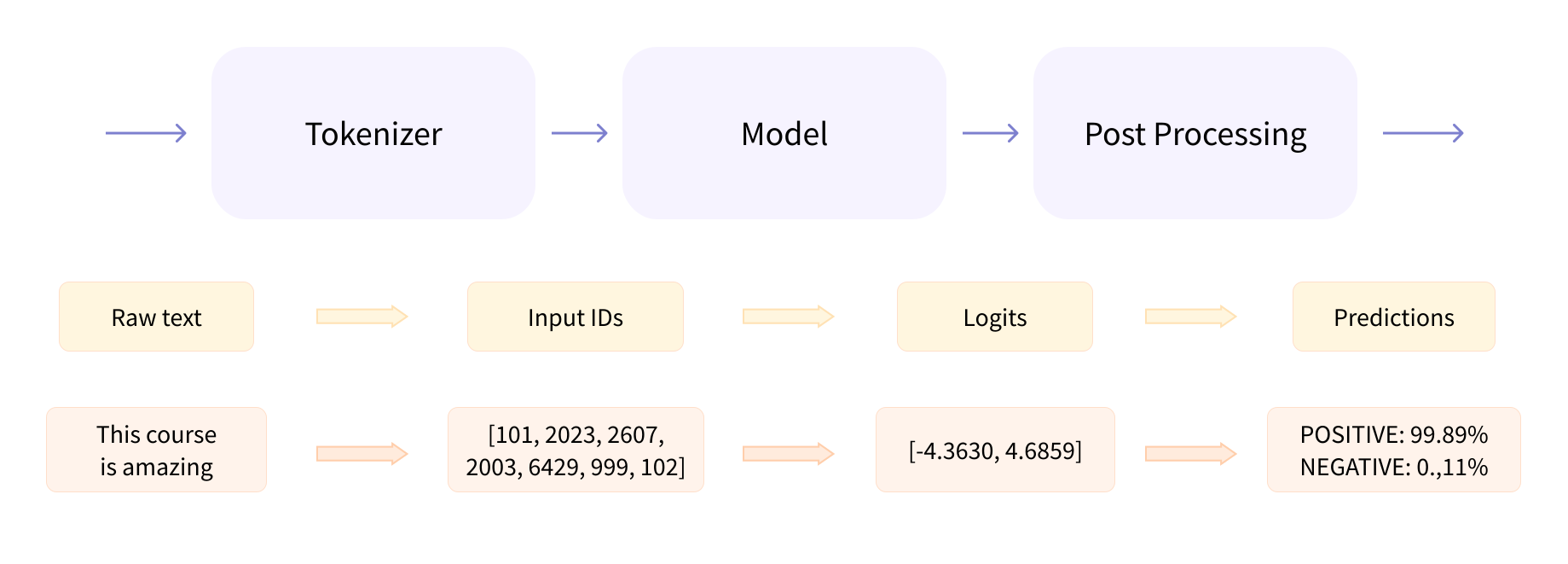
这里有两个核心对象:tokenizermodeltokenizer 负责把文本变成模型能处理的数字序列;model 负责把数字序列送进 Transformer,得到输出表示或预测结果。

整体流程可以写成:

图 1:Hugging Face Transformers 的基本调用流程

也就是:

inputs = tokenizer('Hello world', return_tensors='pt')
print('Tokenizer output keys:', list(inputs.keys()))

outputs = model(**inputs)
print('Model output keys:', list(outputs.keys()))
Tokenizer output keys: ['input_ids', 'token_type_ids', 'attention_mask']
Model output keys: ['last_hidden_state', 'pooler_output']

这里的 **inputs 会把 tokenizer 返回的字典展开成模型 forward 需要的参数。常见字段包括 input_idsattention_mask,有些模型还会返回 token_type_idsposition_ids。不同模型结构需要的输入不完全一样,但 AutoTokenizer 通常会根据模型自动返回合适的字段。

outputs 也是一个结构化对象,包含了模型前向传播的结果。常见字段包括 last_hidden_statelogitspooler_outputattentionspast_key_values 等。但这些字段不一定都会出现,具体取决于模型类型、任务头,以及你在调用时设置的参数。

8.11.1.1 AutoTokenizer:从文本到 Token IDs

Transformer 不能直接处理字符串,它需要的是 token id。比如:

text = 'I love deep learning.'
inputs = tokenizer(text, return_tensors='pt')
pprint(inputs)
{'attention_mask': tensor([[1, 1, 1, 1, 1, 1, 1]]),
 'input_ids': tensor([[ 101, 1045, 2293, 2784, 4083, 1012,  102]]),
 'token_type_ids': tensor([[0, 0, 0, 0, 0, 0, 0]])}

其中,input_ids 表示每个 token 在词表里的编号。例如,一个句子可能被分成:

['I', 'love', 'deep', 'learning', '.']

然后映射成:

[1045, 2293, 2784, 4083, 1012]

这组数字就是 input_ids。至于开头的 101 和结尾的 102,在 BERT 里分别是 [CLS][SEP],它们是一种特殊的 token id,分别表示句子开始和结束。

attention_mask 通常用来区分哪些位置是真实 token,哪些位置是 padding。比如 batch 里有两个句子:

['I love deep learning.', 'Good morning!']

为了组成一个 batch,较短的句子需要补齐到相同长度。例如,第二个句子 padding 后可能是:

['Good', 'morning', '!', '[PAD]', '[PAD]']

这时 attention_mask 大概是:

[1, 1, 1, 0, 0]

其中,1 表示真实 token,0 表示 padding token。

这其实就是前面讲的 key_padding_mask。它用来告诉模型哪些位置可以看,哪些位置不应该参与 attention。

8.11.1.2 AutoModel:Transformer 的主体

AutoModel 会加载模型的基础 Transformer 主体,不包含特定任务头。例如:

from transformers import AutoTokenizer, AutoModel

model_id = 'bert-base-uncased'

tokenizer = AutoTokenizer.from_pretrained(model_id)
model = AutoModel.from_pretrained(model_id)
ipy.clear_output()

inputs = tokenizer('I love deep learning.', return_tensors='pt')
outputs = model(**inputs)
print(list(outputs.keys()))
['last_hidden_state', 'pooler_output']

对于 BERT 这类 encoder-only 模型,AutoModel 返回的是每个 token 的上下文表示。其中最常见的字段是 last_hidden_state,它表示每个 token 在最后一层 Transformer block 的输出。它的形状通常是:

(batch_size, seq_len, hidden_size)

也就是:

\[ H = [h_1, h_2, \dots, h_n] \]

其中,每个 \(h_i\) 对应第 \(i\) 个 token 的上下文表示。这正好对应前面讲的 encoder-only:

\[ X \rightarrow \text{Transformer Encoder} \rightarrow H \]

所以,如果你只想拿到句子或 token 的表示,AutoModel 就很合适。

8.11.1.3 ModelOutput:为什么不是普通 Tuple

调用模型后,我们经常看到:

outputs = model(**inputs)

然后可以用:

outputs.last_hidden_state
outputs.logits
outputs.attentions
outputs.past_key_values

这是因为 Hugging Face Transformers 的模型输出通常是 ModelOutput 的子类。它有点像字典,也有点像 tuple,但更推荐使用属性名访问。比如,outputs.logitsoutputs[0] 更清楚地表达了我们想要的是什么。不同模型、不同任务头会返回不同字段。

  • AutoModel 常见字段是 last_hidden_state
  • AutoModelForSequenceClassification 常见字段是 logits
  • AutoModelForCausalLM 常见字段是 logitspast_key_values
  • 设置 output_attentions=True 后,会额外返回 attentions
  • 设置 output_hidden_states=True 后,会额外返回 hidden_states

所以,看到 outputs 时,不要把它想成一个神秘对象,它只是把模型前向传播的结果整理成了一个结构化输出。

8.11.2 Encoder-only 模型:理解输入序列

前面我们已经看到,AutoModel 可以加载一个 Transformer 主体,并返回每个 token 的上下文表示。对于 encoder-only 模型来说,这正是它最核心的用途:通过双向 self-attention,让序列中的每个位置都能同时看到左右上下文,从而得到更适合理解任务的表示。

不过,只有上下文表示还不够。真实任务通常还需要在这些表示之上做进一步预测:如果是文本分类,我们希望给整段文本预测一个类别;如果是命名实体识别,我们希望给每个 token 预测一个标签。因此,在 Transformers 库中,除了 AutoModel 之外,还提供了许多带任务头的模型。

8.11.2.1 SequenceClassification:Encoder + 分类头

如果我们要做文本分类,通常不会只用 AutoModel,而是使用带任务头的模型:

from transformers import AutoTokenizer, AutoModelForSequenceClassification

model_id = 'bert-base-uncased'

tokenizer = AutoTokenizer.from_pretrained(model_id)
model = AutoModelForSequenceClassification.from_pretrained(
    model_id,
    num_labels=2,
)
ipy.clear_output()

它的结构可以理解成:

\[ \operatorname{Encoder} + \operatorname{Classification Head} \]

也就是:

\[ X \rightarrow \text{BERT Encoder} \rightarrow h_{\mathrm{[CLS]}} \rightarrow \text{Linear} \rightarrow \text{logits} \]

调用方式是:

inputs = tokenizer('This movie is great!', return_tensors='pt')
outputs = model(**inputs)

logits = outputs.logits
print(logits.shape)
torch.Size([1, 2])

其中,logits 就是分类头输出的原始分数。它的形状通常是:

(batch_size, num_labels)

如果 num_labels=2,就表示每个样本输出两个类别分数。这里我们并没有说明这两个类别是什么。它们可能是正面和负面,也可能是其他任何两个类别。具体含义取决于我们训练模型时用的标签。

所以,总结起来就是:

AutoModel 给你的是基础表示;AutoModelForSequenceClassification 给你的是基础表示加分类头。

这就是 Hugging Face API 命名里 For... 的含义:它表示这个模型是为某个具体任务准备的。

8.11.2.2 TokenClassification:每个 Token 一个预测

如果任务是命名实体识别,或者其他 token-level 分类,就可以使用:

from transformers import AutoModelForTokenClassification

model_id = 'bert-base-uncased'

model = AutoModelForTokenClassification.from_pretrained(
    model_id,
    num_labels=9,
)
ipy.clear_output()

它和 sequence classification 的区别是:分类不是只对整个句子做一次,而是对每个 token 都做一次。

它的结构可以理解成:

\[ h_i \rightarrow \operatorname{Linear} \rightarrow \text{logits}_i \]

调用方式和前面类似:

inputs = tokenizer('Hugging Face is based in New York.', return_tensors='pt')
outputs = model(**inputs)

logits = outputs.logits
print(logits.shape)
torch.Size([1, 10, 9])

输出形状通常是:

(batch_size, seq_len, num_labels)

也就是说,每个 token 都有一个类别分布。这对应前面讲 encoder-only 输出怎么用时的 token-level 任务:

\[ \hat{y}_i = \mathrm{Classifier}(h_i) \]

8.11.2.3 一个完整的 Encoder-only 示例

下面是一个 BERT 风格文本表示例子:

import torch
from transformers import AutoTokenizer, AutoModel

model_id = 'bert-base-uncased'

tokenizer = AutoTokenizer.from_pretrained(model_id)
model = AutoModel.from_pretrained(model_id)
ipy.clear_output()

texts = [
    'I love deep learning.',
    'Transformers are powerful models.',
]

inputs = tokenizer(
    texts,
    return_tensors='pt',
    padding=True,
    truncation=True,
)

with torch.inference_mode():
    outputs = model(**inputs)

last_hidden_state = outputs.last_hidden_state
sentence_embedding = last_hidden_state.mean(dim=1)

print('Last hidden state shape:', last_hidden_state.shape)
print('Sentence embedding shape:', sentence_embedding.shape)
Last hidden state shape: torch.Size([2, 7, 768])
Sentence embedding shape: torch.Size([2, 768])

这里的 last_hidden_state 是每个 token 的上下文表示。

如果输入 batch 里有 padding,更严谨的平均池化应该结合 attention_mask,只对真实 token 求平均:

mask = inputs['attention_mask'].unsqueeze(-1)
masked_hidden = last_hidden_state * mask

sentence_embedding = masked_hidden.sum(dim=1) / mask.sum(dim=1)

这对应 encoder-only 的核心用途:

把输入文本编码成上下文表示。

8.11.3 Decoder-only 模型:自回归生成

如果说 encoder-only 模型更擅长理解已经给定的输入,那么 decoder-only 模型更擅长根据已有内容继续生成。它使用 masked self-attention,让当前位置只能看到自己之前的 token,然后一步一步预测下一个 token。

不过,模型每次前向传播并不会直接生成完整文本,而是输出每个位置的 logits,用来预测下一个 token。完整的自回归生成需要反复执行预测下一个 token + 拼回输入序列的过程。Transformers 库既允许我们直接查看 logits,也提供了 generate 接口来封装这个生成循环。

8.11.3.1 CausalLM:Decoder-only 语言模型

如果我们要加载 GPT 风格的 decoder-only 模型,通常使用:

from transformers import AutoTokenizer, AutoModelForCausalLM

model_id = 'gpt2'

tokenizer = AutoTokenizer.from_pretrained(model_id)
model = AutoModelForCausalLM.from_pretrained(model_id)
ipy.clear_output()

CausalLM 的意思是 causal language modeling,也就是从左到右预测下一个 token。它对应的训练目标是:

\[ p(x_1, x_2, \dots, x_n) = \prod_{t=1}^{n} p(x_t \mid x_{<t}) \]

调用 forward 函数:

inputs = tokenizer('I love deep', return_tensors='pt')
outputs = model(**inputs)

logits = outputs.logits
print(logits.shape)
torch.Size([1, 3, 50257])

这里的 logits 形状通常是:

(batch_size, seq_len, vocab_size)

它表示每个位置对词表中所有 token 的预测分数。

比如输入是:

I love deep

最后一个位置的 logits 可以用来预测下一个 token:

next_token_logits = logits[:, -1, :]

这对应自回归生成里的:

\[ p(x_{t+1} \mid x_{\le t}) \]

8.11.3.2 generate:自回归生成的封装

虽然我们可以手动取 logits[:, -1, :],然后一步一步采样,但实际使用中通常直接调用:

inputs = tokenizer(
    'The last human on Earth heard a knock at the door and',
    return_tensors='pt',
)
output_ids = model.generate(**inputs, max_new_tokens=100)

text = tokenizer.decode(output_ids[0], skip_special_tokens=True)
print(text)
[transformers] Setting `pad_token_id` to `eos_token_id`:50256 for open-end generation.
The last human on Earth heard a knock at the door and the doorbell rang.

"Hello, my name is John. I'm a student at the University of California, Berkeley. I'm a student at the University of California, Berkeley. I'm a student at the University of California, Berkeley. I'm a student at the University of California, Berkeley. I'm a student at the University of California, Berkeley. I'm a student at the University of California, Berkeley. I'm a student at the University of California, Berkeley. I

generate() 会帮我们完成自回归生成过程。它内部大致做的是:

for step in range(max_new_tokens):
    outputs = model(input_ids)
    next_token = select_next_token(outputs.logits[:, -1, :])
    input_ids = torch.concat([input_ids, next_token], dim=-1)

这里的流程正好对应前面讲的自回归生成:

\[ x_1 \rightarrow x_2 \rightarrow x_3 \rightarrow \cdots \]

模型每次生成一个新 token,再把它接回输入,继续生成下一个 token。

上面的 generate() 默认采用贪心解码(greedy decoding),也就是每次选概率最高的 token。但它也支持其他采样策略,比如温度采样、top-k 采样、top-p 采样等。比如下面这个例子:

inputs = tokenizer(
    'The last human on Earth heard a knock at the door and',
    return_tensors='pt',
)
output_ids = model.generate(
    **inputs,
    max_new_tokens=100,
    do_sample=True,
    temperature=0.8,
    top_p=0.9,
)

text = tokenizer.decode(output_ids[0], skip_special_tokens=True)
print(text)
[transformers] Setting `pad_token_id` to `eos_token_id`:50256 for open-end generation.
The last human on Earth heard a knock at the door and the door opened with a heavy slam.

"O-oh, I'm sorry, this is a new job."

"What? Why do you have to be here?"

The man who had come to ask about my job asked, "What do you want to do with the rest of your life? You must have a lot of money, and you have to work for a while to get your wages paid. I am not your boss, but you are my boss and

你看,调整了采样参数后,生成的文本就会更有多样性,起码不会当一个复读机。generate() 的参数非常多,我们后面会专门讲一讲它的使用技巧。

8.11.3.3 use_cache:KV Cache 的接口

前面我们讲过 KV cache。它的核心思想是:推理时缓存过去 token 的 key 和 value,避免每一步都重新计算完整前缀。在 Hugging Face Transformers 里,这通常和 use_cache=True 这个参数相关。

对于 decoder-only 或 decoder 部分,模型 forward 时可以返回 past_key_values,它包含了每一层的 key 和 value 缓存。一个简化调用如下:

outputs = model(
    **inputs,
    use_cache=True,
)

past_key_values = outputs.past_key_values

下一步推理时,可以把 past_key_values 传回模型:

next_token_logits = outputs.logits[:, -1, :]
next_input_ids = next_token_logits.argmax(dim=-1, keepdim=True)

next_outputs = model(
    input_ids=next_input_ids,
    past_key_values=past_key_values,
    use_cache=True,
)

这样模型就不需要重新计算所有历史 token 的 key/value,而是只处理新增 token,并复用缓存。

在实际调用 generate() 时,KV cache 通常由 generate() 内部管理,我们不一定需要手动维护 past_key_values。所以可以这样理解:

手写 decoding loop 时,我们可能会直接接触 past_key_values;调用 generate() 时,KV cache 通常被封装在内部。

这正好对应前面 8.9 节讲的内容。

8.11.3.4 一个完整的 Decoder-only 示例

下面是一个最小的 GPT 风格生成例子:

from transformers import AutoTokenizer, AutoModelForCausalLM

model_id = 'gpt2'

tokenizer = AutoTokenizer.from_pretrained(model_id)
model = AutoModelForCausalLM.from_pretrained(model_id)
ipy.clear_output()

text = 'I love deep learning because'
inputs = tokenizer(text, return_tensors='pt')

with torch.inference_mode():
    output_ids = model.generate(
        **inputs,
        max_new_tokens=100,
        do_sample=True,
        temperature=0.8,
        top_p=0.9,
    )

output_text = tokenizer.decode(output_ids[0], skip_special_tokens=True)
print(output_text)
[transformers] Setting `pad_token_id` to `eos_token_id`:50256 for open-end generation.
I love deep learning because it is so simple, and so easy to learn.

It's so easy to see and understand how something works. It's just so much more difficult to use in the real world. The best way to see it is by looking at the data. That way you can learn it.

But there is also the real world. The data. The real world.

When we look at real data, we see the world from the perspective of a human. In real life,

这段代码背后发生的是:

  1. Tokenizer 把文本变成 input_ids
  2. Decoder-only Transformer 对前缀做 causal self-attention;
  3. LM head 输出下一个 token 的 logits;
  4. generate() 根据采样策略选出下一个 token;
  5. 新 token 接回输入;
  6. 重复直到生成结束。

这就是 8.8 和 8.9 讲过的自回归生成和 KV cache 在实际 API 中的体现。

8.11.4 Encoder-Decoder 模型:输入输出序列转换

和 decoder-only 模型不同,encoder-decoder 模型不是单纯根据前文继续生成,而是先理解一个输入序列,再根据这个输入生成另一个输出序列。典型任务包括机器翻译、文本摘要和文本改写。这类模型通常通过 Seq2SeqLM 接口调用。

8.11.4.1 Seq2SeqLM:Encoder-Decoder 生成模型

如果我们要加载 T5、BART 这类 encoder-decoder 模型,通常使用:

from transformers import AutoTokenizer, AutoModelForSeq2SeqLM

model_id = 't5-small'

tokenizer = AutoTokenizer.from_pretrained(model_id)
model = AutoModelForSeq2SeqLM.from_pretrained(model_id)
ipy.clear_output()

这类模型结构可以理解成:

\[ X \rightarrow \operatorname{Encoder} \rightarrow H \rightarrow \operatorname{Decoder} \rightarrow Y \]

例如 T5 的输入通常是 text-to-text 形式:

text = 'Translate English to German: I love deep learning.'
inputs = tokenizer(text, return_tensors='pt')

output_ids = model.generate(
    **inputs,
    max_new_tokens=50,
)

output = tokenizer.decode(output_ids[0], skip_special_tokens=True)
print(output)
Ich liebe das tiefe Lernen.

这里 generate() 仍然是自回归生成,但和 decoder-only 不同的是:

  • Encoder 会先处理完整输入;
  • Decoder 每一步生成时,会通过 cross-attention 读取 encoder 输出;
  • Decoder 内部仍然使用 masked self-attention,不能看到未来输出 token。

这对应前面讲过的 encoder-decoder:

\[ p(y_t \mid y_{<t}, X) = \operatorname{Decoder}(y_{<t}, \operatorname{Encoder}(X)) \]

8.11.4.2 一个完整的 Encoder-Decoder 示例

下面是一个 T5 风格的 text-to-text 示例:

from transformers import AutoTokenizer, AutoModelForSeq2SeqLM

model_id = 't5-small'

tokenizer = AutoTokenizer.from_pretrained(model_id)
model = AutoModelForSeq2SeqLM.from_pretrained(model_id)
ipy.clear_output()

text = 'Translate English to German: I love deep learning.'
inputs = tokenizer(text, return_tensors='pt')

with torch.inference_mode():
    output_ids = model.generate(
        **inputs,
        max_new_tokens=50,
    )

output_text = tokenizer.decode(output_ids[0], skip_special_tokens=True)
print(output_text)
Ich liebe das tiefe Lernen.

这段代码背后发生的是:

  1. Tokenizer 处理输入文本;
  2. Encoder 双向编码完整输入;
  3. Decoder 从起始 token 开始自回归生成;
  4. Decoder self-attention 使用 causal mask;
  5. Decoder cross-attention 读取 encoder 输出;
  6. generate() 返回生成结果。

这正好对应 encoder-decoder 的结构:

\[ X \rightarrow \operatorname{Encoder} \rightarrow H \rightarrow \operatorname{Decoder} \rightarrow Y \]
8.11.5 模型内部信息:Attention 与 Hidden States

前面我们讲过,Transformer 内部有很多重要的结构信息,比如 attention weights、hidden states、KV cache 等等。这些信息对于理解模型行为、调试模型、可视化分析都非常有用。对于 Transformers 库,我们可以通过设置一些参数来取出这些内部信息。

8.11.5.1 output_attentions:取出 Attention Weights

如果我们要可视化 attention map,首先需要拿到模型内部的 attention weights。在 Hugging Face Transformers 中,可以在调用模型时设置 output_attentions=True

Warning

在较新的 Transformers 版本中,部分模型可能默认使用 SDPA 或 FlashAttention 等高效 attention 实现,这些实现有时不会返回 attention weights。如果需要可视化 attention,可以在加载模型时设置 attn_implementation='eager',但这通常会牺牲一部分性能。

from transformers import AutoTokenizer, AutoModelForSequenceClassification

model_id = 'bert-base-uncased'

tokenizer = AutoTokenizer.from_pretrained(model_id)
model = AutoModelForSequenceClassification.from_pretrained(
    model_id,
    num_labels=2,
    attn_implementation='eager',
)
ipy.clear_output()

text = 'I love deep learning.'
inputs = tokenizer(text, return_tensors='pt')

outputs = model(
    **inputs,
    output_attentions=True,
)

然后读取:

attentions = outputs.attentions
print('Number of layers:', len(attentions))
print('Attention shape per layer:', attentions[0].shape)
Number of layers: 12
Attention shape per layer: torch.Size([1, 12, 7, 7])

对于 encoder-only 或 decoder-only 模型,attentions 通常是一个 tuple,长度等于层数。每一层的 attention shape 通常类似:

(batch_size, num_heads, seq_len, seq_len)

也就是:

\[ A^{(l)} \in \mathbb{R}^{B \times H \times n \times n} \]

我们可以取某一层某个 head:

layer_idx = 0
head_idx = 0

attn = attentions[layer_idx][0, head_idx]
print(attn.shape)
torch.Size([7, 7])

这时 attn 的形状就是 (seq_len, seq_len),它表示这个 head 在这一层对输入序列的 attention 权重。这样,我们就可以拿去画 heatmap。

对于 encoder-decoder 模型,情况会多一些。模型可能返回:

encoder_attentions
decoder_attentions
cross_attentions

它们分别对应:

  • Encoder 内部的 self-attention;
  • Decoder 内部的 masked self-attention;
  • Decoder 到 encoder 的 cross-attention。

其中,cross-attention 最适合用来观察输入和输出之间的对齐关系。

8.11.5.2 hidden_states:取出每一层表示

除了 attention weights,有时我们还想看每一层的 hidden states。这时候,我们可以这样设置:

outputs = model(
    **inputs,
    output_hidden_states=True,
)

然后读取:

hidden_states = outputs.hidden_states
print('Number of layers:', len(hidden_states))
Number of layers: 13

通常它也是一个 tuple,包含 embedding 输出和每一层 Transformer block 的输出。例如,对于一个 12 层的模型,hidden_states 可能包含 13 个元素。其中第 0 个通常是 embedding 层输出,后面才是每一层 Transformer 的输出。

某一层的 hidden state 形状通常是:

(batch_size, seq_len, hidden_size)

这对应我们前面一直写的:

\[ H^{(l)} = [h_1^{(l)}, h_2^{(l)}, \dots, h_n^{(l)}] \]

如果我们想研究模型在不同层学到了什么,hidden_states 很有用。

8.11.5.3 一个 Attention Visualization 的接口示例

如果想取出 attention weights,可以这样写:

from transformers import AutoTokenizer, AutoModel

model_id = 'bert-base-uncased'

tokenizer = AutoTokenizer.from_pretrained(model_id)
model = AutoModel.from_pretrained(
    model_id,
    attn_implementation='eager',
)
ipy.clear_output()

text = 'The animal did not cross the street because it was tired.'
inputs = tokenizer(text, return_tensors='pt')

with torch.inference_mode():
    outputs = model(
        **inputs,
        output_attentions=True,
    )

attentions = outputs.attentions
tokens = tokenizer.convert_ids_to_tokens(inputs['input_ids'][0])

layer_idx = 0
head_idx = 0
attn = attentions[layer_idx][0, head_idx]

print('Attention weights shape:', attn.shape)
print('Tokens:', tokens)
Attention weights shape: torch.Size([14, 14])
Tokens: ['[CLS]', 'the', 'animal', 'did', 'not', 'cross', 'the', 'street', 'because', 'it', 'was', 'tired', '.', '[SEP]']

此时 attn 的形状是 (seq_len, seq_len),它就可以用来画 heatmap,观察这个 head 在这一层对输入 token 的 attention 权重分布。不过要注意:

这张图展示的是某一层某个 head 的 attention 权重,不是模型最终预测的完整解释。

在后面我们会讲这是为什么。

8.11.6 labels:训练时的损失怎么来

很多 For... 模型在 forward 时可以传入 labels=...。如果传入 labels,模型会自动计算 loss。

例如文本分类:

from transformers import AutoTokenizer, AutoModelForSequenceClassification

model_id = 'bert-base-uncased'

tokenizer = AutoTokenizer.from_pretrained(model_id)
model = AutoModelForSequenceClassification.from_pretrained(
    model_id,
    num_labels=2,
    attn_implementation='eager',
)
ipy.clear_output()

inputs = tokenizer(
    ['This movie is great!', 'This movie is terrible!'],
    return_tensors='pt',
    padding=True,
)
labels = torch.tensor([1, 0])
outputs = model(**inputs, labels=labels)

loss = outputs.loss
print('Loss:', loss.item())
Loss: 0.6980242729187012

这里的模型内部大致做的是:

\[ \text{logits} \rightarrow \text{loss function} \rightarrow \text{loss} \]

对于 sequence classification,常见的是交叉熵损失。对于 causal language modeling,也可以传入 labels:

from transformers import AutoTokenizer, AutoModelForCausalLM

model_id = 'gpt2'

tokenizer = AutoTokenizer.from_pretrained(model_id)
model = AutoModelForCausalLM.from_pretrained(model_id)
ipy.clear_output()

inputs = tokenizer('I love deep learning.', return_tensors='pt')
outputs = model(
    **inputs,
    labels=inputs['input_ids'],
)

loss = outputs.loss
print('Loss:', loss.item())
[transformers] `loss_type=None` was set in the config but it is unrecognized. Using the default loss: `ForCausalLMLoss`.
Loss: 5.5497236251831055

这时模型会计算 next-token prediction 的 loss。也就是说,用前面的 token 预测后面的 token。这个接口和前面讲 teacher forcing 的地方也能对应起来:

训练时完整目标序列已知,模型可以并行计算每个位置的预测,再和 labels 对齐计算 loss。

8.11.7 一张结构到 API 的对应表

可以把前面讲过的概念和 Hugging Face API 对应起来:

表 1:Transformer 结构和 Hugging Face API 的对应关系
前面讲的概念 Hugging Face 里常见接口
Tokenization AutoTokenizer.from_pretrained(...)
Token ids inputs['input_ids']
Padding mask inputs['attention_mask']
Encoder-only backbone AutoModel / AutoModelForSequenceClassification
Decoder-only LM AutoModelForCausalLM
Encoder-decoder LM AutoModelForSeq2SeqLM
Token 表示 outputs.last_hidden_state
分类分数 outputs.logits
每层 hidden states output_hidden_states=True / outputs.hidden_states
Attention weights output_attentions=True / outputs.attentions
Cross-attention weights outputs.cross_attentions
自回归生成 model.generate(...)
KV cache use_cache=True / outputs.past_key_values
训练 loss labels=... / outputs.loss

这张表的作用是把结构理解和代码调用连起来。以后你看到一个 Hugging Face 代码片段时,可以先问自己:

这个 API 对应的是 Transformer 的哪一部分?

这样就不容易把接口当成黑箱。

8.11.8 本章小结

这一节里,我们把 Transformer 的结构和 Hugging Face Transformers 的常用 API 对应了起来。

AutoTokenizer 负责把文本转成 input_idsattention_maskAutoModel 负责加载基础 Transformer 主体;AutoModelForSequenceClassificationAutoModelForTokenClassificationAutoModelForCausalLMAutoModelForSeq2SeqLM 则是在基础模型上加了不同任务头或生成接口。

对于 encoder-only 模型,最常见的输出是 last_hidden_state,它表示每个 token 的上下文表示。对于 decoder-only 和 encoder-decoder 生成模型,最核心的是 logitsgenerate():前者给出下一个 token 的预测分数,后者封装了自回归生成过程。

output_attentions=True 可以让模型返回 attention weights,用于可视化;output_hidden_states=True 可以返回每一层 hidden states,用于分析表示变化;use_cache=Truepast_key_values 则对应 KV Cache,用来加速自回归推理。

到这里,第 8 章就从 attention 的直觉、数学形式、Transformer 结构,一路走到了真实模型调用。理解这些接口背后的结构以后,Hugging Face Transformers 就不再只是一个能跑模型的库,而是可以帮助我们把理论、实现和真实预训练模型连接起来的工具。祝大家在使用 Transformers 的过程中,一切顺利!